

Compact Flash, SD, SDHC and SDXC Memory Cards
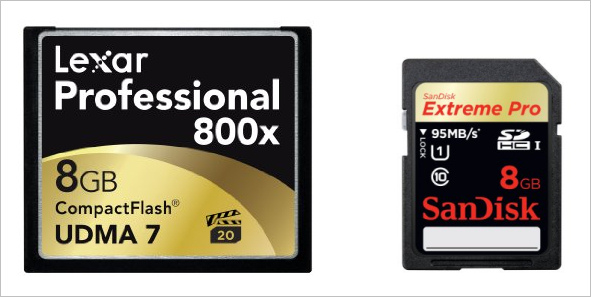
A common question from new digital camera owners is "which memory card should I buy". The answer depends on a number of factors including how much you can afford to spend and which camera you own.
While compact flash (CF) has long been been the traditional memory format for DSLRs, secure digital (SD) is becoming more and more common, and a few cameras can take both types of card - and even record the same images to each for added image security. The vast majority of current compact digicams use SD cards (or similar proprietary formats). I don't think any current (02/13) compact digicams still use CF cards.
The first question to answer is probably "What is a Compact Flash or SD memory card"?. In a nutshell it's a solid state memory device which retains data even without power being applied to it. "Compact Flash" or CF defines the physical format (and electrical interface) of the card. Within the card are one or more solid state flash memory chips, plus an ATA memory controller.
Secure Digital (SD) cards are similar, though they do not have on on-board memory controller and are physically smaller in size.
CF cards originally came in two different sizes:
- CF type I - 36.4 x 42.8 x 3.3mm
- CF type II - 36.4 x 42.8 x 5.0mm
For historical reference, the type I interface can supply up to 70mA to the card, while the type II interface can supply up to 500mA, so you can see that a type II interface would be required if the card required a lot of power.
Microdrives
Note: This section is mostly for historical interest
So what's a microdrive? Well, it's a very small disk drive rather than solid state memory. It has a rapidly spinning hard disk just like the disk drive in your PC. The only difference is in size. In the early days of CF cards, microdrives had higher capacity than solid state cards, plus the cost per MB of storage was lower. Today (02/13) that's no longer the case, and I can't see any reason to buy a microdrive, even if you could find one!. The disadvantages of microdrives are that they are a little larger and draw more power then solid state CF memory and they are probably a little more fragile (though they are pretty tough!). People have put solid state CF cards through a washing machine with no damage. I don't think a microdrive would survive that. Microdrives are also not recommended for use at high altitude (over 12,000ft) due to problems with air bearings at lower atmospheric pressure.
Microdrives draw more power than solid state CF cards. Here's a table with some typical values:
| Device | Standby/Sleep | Idle | Read | Write | Peak |
| IBM 340MB Microdrive | 65mA | 200mA | 300mA | 300mA | 320mA |
| IBM 1G Microdrive | 20mA | 150mA | 200mA | 250mA | 400mA |
| SanDisk Flash Memory Card | 200uA | 200uA | 32-45mA | 32-60mA | 150mA |
Speed
The most important performance characteristic of a memory card is the speed at which it can read and write data. Usually the write speed is the more important since it determines (or can influence) the maximum speed at which a digital camera can shoot under some conditions, such as while the memory buffer is filling. If the camera can write out data to the card fast enough, the buffer will never fill. That requires both a fast card and high speed camera data transfer. Just one or the other is not enough.
Speed is often given as a multiplier, such as 133x, 300x or 1000x. Usually there no indication of what 1x is, but it's typically defined as a read/write (or just write) speed of 150 kB/s, that's 150 kilobytes of data per second (which was the original audio CD data transfer rate). The current range is up to 1000x. I don't think I've ever seen a 1x card, 133x and 300x cards are fairly common and 1000x is about the fastest (02/13). An 1000x card should be able to be read at a sustained speed of 150 MB/s. Write speeds are usually lower, for example the Lexar Professional 1000x UDMA CF card has a maximum write speed of up to 95 MB/s using UDMA 7 (Ultra Dynamic Mode Access). Note that these are the maximum speeds at which the card can operate under ideal conditions with the fastest possible optimized interface. If a camera can only output data at 10MB/s, having a card that could accept data at 150 MB/s won't speed things up much compared to a card that could accept data at 20 MB/s.
Note that there are two different types of memory cells used in CF memory. The first and fastest is called a Single Level Cell (SLC) which stores 1 bit in each cell. There's also a slower (but cheaper) architecture called Multi Level Cell which stores two bits in each cell. Both technologies are getting faster, but the fastest cards are always based on SLC technology. SLC technology also uses a little less power then MLC, so that's another advantage. The main advantage of MLC is in cost per megabyte.
The real question is not how fast a manufacturer says a card is, but will a 300x card actually give you 4x faster performance than a 133x card when you use it in a camera? The answer is often "no". The speed at which data is written to the card depends on three factors. First there's the maximum write speed of the card. Second there's the maximum write speed of the camera. Third there's the efficiency of the interaction between the camera's software and the card's onboard controller. All three of these can influence the speed at which data actually gets written.
As an example let's look at 3 cameras and how they typically perform with fast and slow cards when writing RAW files:
| Faster card (1000x) | Slower card (300x) | Slower card (133x) | Slow card (40x) | |
| Canon EOS 5D MkIII | 80 MB/s | 37 MB/s | 12 MB/s | ? MB/s |
| Canon EOS 7D | 57 MB/s | 35 MB/s | 12 MB/s | ? MB/s |
| Canon EOS 20D | ? | ? | 6 MB/s | 5 MB/s |
As you can see, The fastest camera (Canon EOS 5D MkIII) gains more out of a 1000x card than a Canon EOS 7D does, though the 7D is fast enough to still gain some advantage from the fastest card. Older cameras like the EOS 20D wrote so slowly that there's hardly any difference between a 40x card and a 133x card. I'm sure a 300x or 1000x wouldn't increase the write rate above that of a 133x card since the speed limitation is clearly in the camera, not the card.
Card speed also affects the time taken to transfer the data from the card to a computer, or the time taken to review images "in camera", so it does more than just determine how fast you can shoot. Typically read speeds are a little faster than write speeds. So even with an old. slow camera, if you use a compatible card reader to read the memory card you can still transfer the contents of the card much faster with a fast card than a slow card.
Write Acceleration - WA and Ultra Dynamic Mode Access
In days of old Lexar used to have CF cards with "write acceleration" technology. This gave somewhat faster performance in some cameras which supported the WA interface. Today, the fastest transfer technology utilizes the UDMA 7 protocol which allows transfer at speeds up to 167 MB/s (if the card itself is fast enough).
SD vs. CF What's the difference - and what's SDHC, SDXC and Mini/Micro SD?
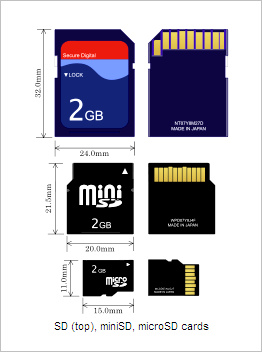
Secure Digital (SD) cards are quite a bit smaller and lighter than CF cards. They have a 9 pin interface rather than a 50 pin interface and this limits them to a 4-bit data transfer bus rather than the 16-bit data transfer bus of CF cards. In principle this makes their maximum possible transfer speed slower, but in practice there is little difference when used with current digital cameras. In the past SD cards were more expensive than CF cards and were not available in as high a capacity versions, but this is no longer true. The Mini and Micro SD formats were developed for small devices such as cell phones and I'm not aware of any mainstream cameras that use Mini or Micro SD cards, although Mini/Micro SD to SD card adapters are widely available and very cheap. They allow the Mini/Micro SDHD/XC cards to be inserted in the SD card adapter and the SD card adapter (which looks exactly like an SD card) can be used in the camera. SDHC/XC to CF card adapters are also available.
SD cards can hold up to 2GB, SDHC (Secure Digital High Capacity) cards can hold up to 32GB while SDXC (Secure Digital eXtended Capacity) cards can theoretically hold up to 2TB (2000GB). While SD cards can be used in SDHX and SDXC cameras, SDHC and SDXC cards cannot be used in cameras designed originally only to use SD cards.
SD(HC/XC) cards have speed class ratings of 2, 4, 6 and 10 corresponding to minimum read write speeds of 2MB/s, 4 MB/s, 6 MB/s and 10 MB/s. These are minimum sustained write speeds for a card in a fragmented state, which represents real world conditions. Some may also have speed "x" ratings which represent ideal transfer conditions.
UHS-I SDHC and SDXC cards support a clock frequency of 100 MHz (4x the original "Default Speed"), which in four-bit transfer mode can transfer data at up to 50 MB/s. There are also standards for higher speeds, UHS-104 should be able to transfer data at up to 104 MB/s. UHS-II cards would have a theoretical maximum data transfer rate of 312 MB/s
Note that there is no official class above class 10, so whether a card speed just meets class 10 requirements or is 5x faster than class 10 requirements, it still gets a class 10 rating. Look at the card specs to see what the actual card speed is. A Class 10 card has a minimum 10 MB/s read write speed, but, for example, the SanDisk Extreme Pro 8 GB SDHC Class 10 UHS-1 is rated at 95 MB/s, while the Transcend 8 GB Class 10 SDHC (still a very good card) is rated at 20/18 MB/s read/write. So the Sandisk card would be a Class 95 card if such a class existed, while the less expensive Transcend card might only be class 18. As it stands now, they are both class 10.
Data Retention
Although flash memory (which is used in both CF and SD cards) is "non-volatile" the data stored on them has a finite life. Non-volatile just means that the data is retained when the power is removed. The hotter the storage temperature the shorter the time to data loss. Under normal conditions you can probably count on the data being good for at least 10 to 20 years. It might be good for 100 years, however data storage in flash memory is not archival. Given long enough, it will fail through a charge leakage mechanism.
Flash memory can also "wear out". The data storage cells can only be written to a finite number of times. How many times depends on the device structure, temperature etc., but the number is probably somewhere between 10,000 and 1,000,000 read/write cycles.
Which Cards are Fastest
Currently (02/13) the fastest SDXC cards (such as the SanDisk 64GB SDXC Memory Card Extreme Pro Class 10 UHS-I) can be read at up to 95 MB/s and can be written at speeds up to 90 MB/s. As you can see there's not much difference between the fastest SDXC and the fastest CF cards (150MB/s read, 95 MB/s write), though CF cards still have a slight speed edge
Which Cards are the Cheapest
These days SDXC/SDHC cards seem to be cheaper than similar speed CF cards. For example:
- Lexar 64GB CompactFlash Memory Card Professional 1000x UDMA - $300
- SanDisk 64GB SDXC Memory Card Extreme Pro Class 10 UHS-I - $130
- SanDisk 32GB CompactFlash Memory Card Extreme 400x UDMA - $85
- SanDisk 32GB SDHC Memory Card Extreme Class 10 UHS-I - $35
Are there adapters? Yes, there are - with some reservations. Most (all?) of them are adapters to CF Type II (see above), which is a thicker package than the normal CD card, so make sure your camera can accept CF type II crads. Also the full speed of the inserted SD/HC/XC card may not be obtained.
So which card to buy?
One that's as fast as your camera, but no faster! There's no point in buying the fastest card you can find (= the most expensive card) if your camera can't transfer data to it at that fast rate. Typically you'd only get your money's worth out of a fast card if you have a high end DSLR.
If you're shooting HD video on an SDHC or SDXC card I'd get a card that is at least class 6. With CF cards there's not much reason to buy anything slower than 300x as prices typically don't go down with cards slower than that and most current DSLRs can use the extra speed. If you have an older DSPR and find a bargain price on a 133x card, that should be fine too.
Reading the data from memory cards
While you can download data from memory cards still in the camera using a USB connection, the fastest and most relable method is using a properly optimized external card reader. These can transfer data much faster than most cameras and much faster than the memory card readers often built into PCs and laptops. The latest ones use USB 3.0 (but are compatible with USB 2.0 at lower transfer speed). For example:
Cards to buy and Cards to avoid
Most of the major CF cards are reliable and most have a good warranty. For example I had a Simple Technology card which failed. I did not have the original sales receipt but I emailed them with the serial numbers on the card and asked if there was any chance of the card being under warranty. They said yes, I mailed the card to them and they sent me a new one by return mail. Pretty good service. I also hear good reports about Viking, Kingston, Lexar and SanDisk.
While Ebay is an excellent source for many items, be very careful when buying memory cards though them. There are apparently lots and lots of fake memory cards being sold there. The cards may not be made by the manufacturer advertised, they may not have the advertised capacity and they may not have the advertised speed. There are companies in China (and maybe elsewhere) who will put any label on a card you want if you buy from them in bulk. Some resellers do just that, buying off-brand, low capacity, low speed cards and putting name-brand, high capacity, high speed labels on them. You you're almost certain to be OK OK buying from a reputable major US retailer (e.g. Adorama), but if you buy a cheap card from a dealer in the far east, or someone reselling cards from them, you're gambling on getting what you get and the odds aren't particularly in your favor. Be warned.
